Client galleries
Client gallery software for photographers
Deliver every shoot as a gallery your client opens with one link: your photographs at full resolution, in a design that suits the work, under your studio's name. No account for the client, no app, and no fee per gallery or per client.
No card, and the free plan does not expire.
One link, no account
Your client opens the gallery in any browser, on a phone or a computer. There is nothing to install and no account to create, which is the moment most galleries lose people.
- Send it your way. Copy the link into WhatsApp, iMessage or an email, or let Aurant email it: the message shows your cover photo, your note and the link, under your studio's name, and nothing goes out until you press Send.
- Know who is looking. Ask for a name and email before the gallery opens, or set a password.
- Keep a private cover private. When a locked gallery's link is pasted into a chat, you choose whether the preview shows the cover or nothing until the password is entered.
- Set an end date when access should be time-limited.

17 designs, chosen per gallery
Pick the design that suits the shoot: a quiet grid for a family session, a cinematic cover for a wedding, an editorial layout for commercial work. There are 17 designs, 11 of them on the free plan, and you can open each one as a full sample gallery before you choose.
The design is a setting, not a rebuild: change it later and the photographs, chapters and link stay exactly where they are. Your logo, colours and fonts come from your brand kit; you choose the focal point of the cover so the important part of the photo always stays in view, and you can add music that plays when your client starts the slideshow.
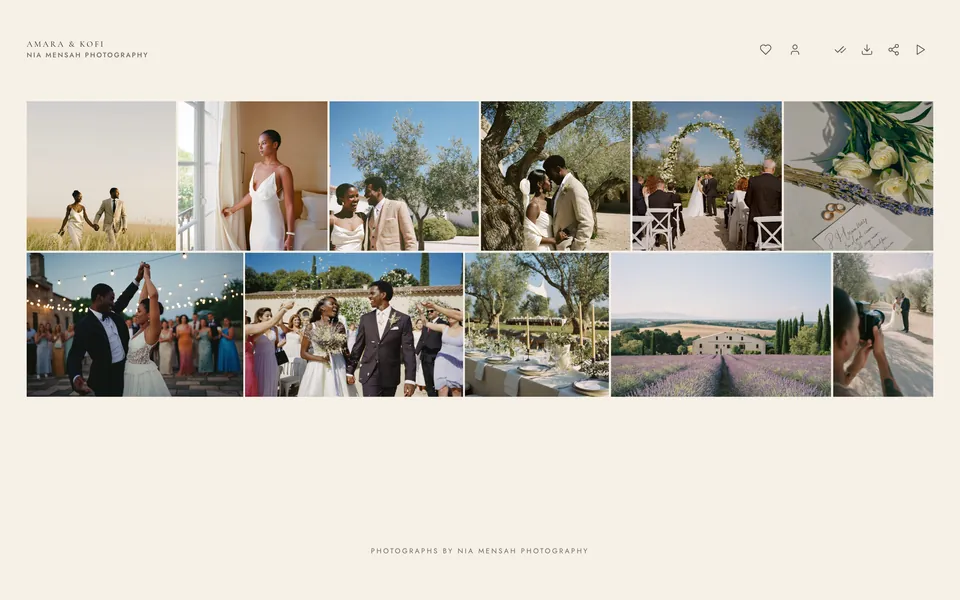
Full resolution, never recompressed
Aurant stores and delivers your photographs at the resolution you uploaded. Clients browse lighter previews, so the gallery opens quickly even on mobile data, and download the originals when you allow it. Your files keep their names, and Aurant never trains anything on them.
You decide what can be downloaded and by whom: allow downloads or not, limit them, and see who downloaded what from the gallery's activity.
Proofing, favourites and comments
- Proofing. Clients mark the photographs they want edited. In proofing, images are watermarked and can't be downloaded.
- Favourites. Clients heart the ones they love, and you see their picks.
- Comments. Clients leave notes on photographs, and you reply from the gallery's activity page.
- Watermarks. Your name or logo on every image clients see. The originals stay clean.
Built for weddings and events
Group a long day into sets such as Ceremony and Reception, or let Aurant make one set per folder. From Basic, guests can find the photographs they appear in with face search, instead of scrolling through hundreds. And if you choose to, you can sell digital downloads from a gallery at your own price; Aurant takes no cut.
Films sit beside the photographs in the same gallery and play straight from the link. See video delivery for how films are handled.
Made from the files you already have
A gallery is built from your files, not from copies: upload a shoot, or pick photographs and whole folders you have already uploaded to your Aurant drive, without uploading them again. Save your usual settings as a preset and the next gallery starts in one click.
Around the gallery, the rest of the job is in the same account: contracts with online signing and booking pages on every plan, and invoices, quotes and client management from Basic.
What it costs
The free plan has 5 GB of storage and unlimited galleries, with no limit on files per gallery, no card and no time limit. Basic is £9 a month with 200 GB. There are no fees per gallery or per client on any plan, and paying yearly saves 15%. See every plan.
Coming from another platform? Read how Aurant compares with Pixieset, Pic-Time and ShootProof, including where they are the better choice, or the guide to choosing a client gallery.
Questions.
- What is a client gallery?
- A private web page where a photographer delivers a shoot: the client views the photographs, picks favourites and downloads them, from one link. It replaces sending files by email, WeTransfer or a shared drive folder.
- Is there a free plan?
- Yes, with no time limit and no card: 5 GB of storage, one portfolio and unlimited galleries, with no limit on files per gallery, and 11 of the 17 gallery designs.
- Are my photographs compressed?
- No. They are stored and delivered at the resolution you uploaded. Clients browse lighter previews so the gallery opens quickly, and download the originals when you allow it.
- Do my clients need an account or an app?
- No. They open one link in any browser, on a phone or a computer. You can ask for a name and email first, or set a password.
- Can clients choose the photos they want edited?
- Yes. Turn on proofing and clients mark the photographs they want; in proofing, images are watermarked and can't be downloaded. They can also add favourites and leave comments.
- Can I sell prints?
- Not today: Aurant has no print store or lab integration. From Basic, you can sell digital downloads from a gallery at your own price, and Aurant takes no cut.