Contracts and booking for photographers
Take a client from first enquiry to signed contract without a spreadsheet: a booking page with your own hours, contracts they sign on their phone, questionnaires, and a pipeline that shows where every job stands. It is on every plan, Free included.
No card, and the Free plan does not expire.
Contracts signed online
Write a contract once and send it in a few clicks. Start from a ready-made agreement for photography, portrait sessions or videography, in English or French, and make it yours. Merge fields fill in your client's name, the event, the package and the payment terms, and you can leave blanks your client completes before signing.
- Signed on any device. Your client opens the link, with no account, agrees to sign electronically, and signs by drawing with a finger or a mouse, or by typing their name.
- Countersigned by you. Once you countersign, you both receive the final copy by email.
- Reminders on their own. While a contract waits, Aurant reminds your client 3, 7 and 14 days after you sent it. Turn reminders off for any contract, or send one yourself.
- A record that holds. The text is locked once sent. The signed contract is kept with a fingerprint that shows it hasn't changed since, and a timeline of when it was sent, opened, signed and countersigned.
The starter contracts are a place to begin, not legal advice. Have yours checked for the country you work in.
A booking page with your own hours
Share one link, or a direct link for each kind of session, and clients choose a time that suits you both. Each session type has its own length, price and place (at your studio, at the client's, by phone or by video call), the time you need before and after, the notice you need, how far ahead people can book and how many you take in a day.
Set your weekly hours, then close a day or open special hours on a date. Clients see times in their own time zone, get a calendar invitation with the confirmation, and can reschedule or cancel online up to the deadline you set. If two people pick the same time, only the first gets it.
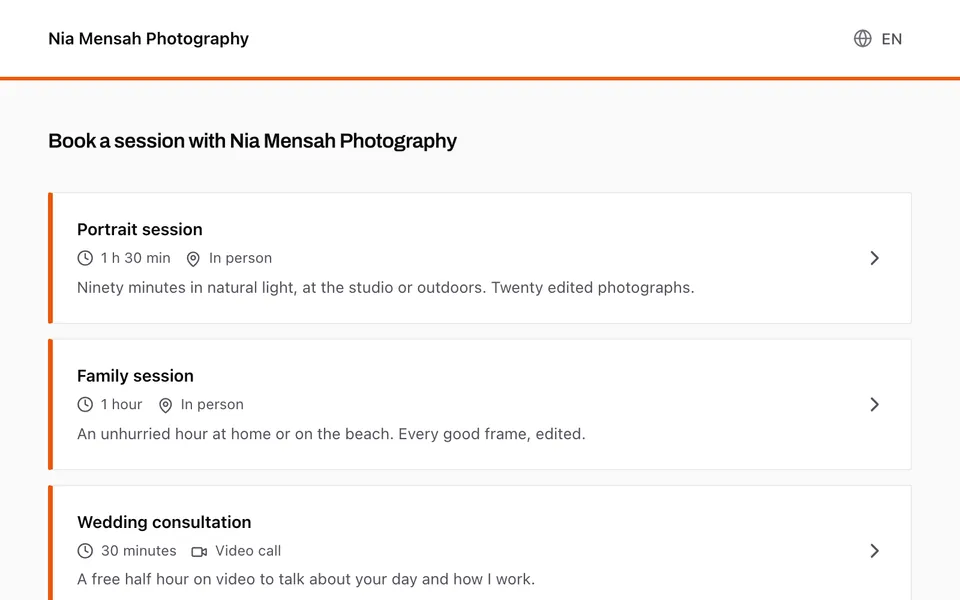
Contract, questionnaire and deposit as soon as they book
A session type can send a contract, a questionnaire and a deposit request the moment someone books, and the confirmation screen shows all three as next steps. When a deposit is requested, the balance invoice is drafted for you, due 14 days before the event.
Deposits are paid online through the payment account you connect: see invoices and payments.
Every enquiry in one pipeline
Enquiries from your portfolio and every new booking arrive as cards on a board, in stages you name yourself. Set a follow-up date, move the card as the job moves, and turn it into a client when they say yes. The pipeline also shows your win rate and which sources bring you work.
Questionnaires instead of long email threads
Ask what you need to know before the day: short and long answers, single and multiple choice, dates and file uploads, grouped in sections. Your client fills it in from a link, with no account, and their answers are saved as they go. Start from a wedding, portrait or event questionnaire and adapt it.
Automations for the steps you repeat
Choose what starts an automation: a new enquiry, a confirmed booking, a signed contract, a submitted questionnaire, a delivered gallery, a paid or overdue invoice, or a number of days before or after the event. Then line up the steps: send an email, a contract, a questionnaire or an invoice, ask for a deposit or a review, create a task, move the card, tell your team, or wait.
Any step that reaches your client can wait for your approval first, so nothing goes out that you haven't seen. You can pause, resume or cancel a run, and see what each one did.
On every plan
Contracts, booking pages, questionnaires, the pipeline and automations are included on every plan, Free too, with no fee per contract or per booking. On Free, a booking makes a client account for up to 3 clients; after that, new bookings still arrive in your pipeline. Basic, at £9 a month, has no limit on clients. See every plan.
Clients see the booking page, contracts and questionnaires in English or French, and you choose the language of each contract and questionnaire.
Questions.
- Can I use contracts and booking on the free plan?
- Yes. Contracts, booking pages, questionnaires, the pipeline and automations are on every plan, Free included, with no card and no time limit. On Free, bookings make client accounts for up to 3 clients.
- How do clients sign a contract?
- They open the link on any device, with no account, agree to sign electronically, and sign by drawing or by typing their name. You countersign, and you both receive the final copy by email.
- Are there contract templates?
- Yes: starter agreements for photography, portrait sessions and videography, in English and French. They are a starting point, not legal advice, so have yours checked for the country you work in.
- Can clients pay a deposit when they book?
- Yes, when the session type asks for one and you have connected a payment account. The deposit request goes out as soon as they book, and the balance invoice is drafted for you. On Free, it also needs room for the client (up to 3) and counts toward the 3 invoices or quotes the plan includes.
- Do clients see times in their own time zone?
- Yes. The booking page shows times in the client's time zone, with yours alongside, and the confirmation comes with a calendar invitation.
- Does it sync with Google Calendar?
- Your bookings are published to a private calendar feed you can add to Google, Apple or Outlook calendars. It goes one way: free times come from the hours and bookings you keep in Aurant, not from other events in your calendar.
Client galleries · Video delivery · Portfolio website · Invoices and payments