Invoicing and online payments for photographers
Send a quote your client accepts online, turn it into an invoice without retyping it, and get paid by card into your own Stripe account. From Basic, deposits, instalments and reminders run on their own.
No card, and the Free plan does not expire.
Quotes your client accepts online
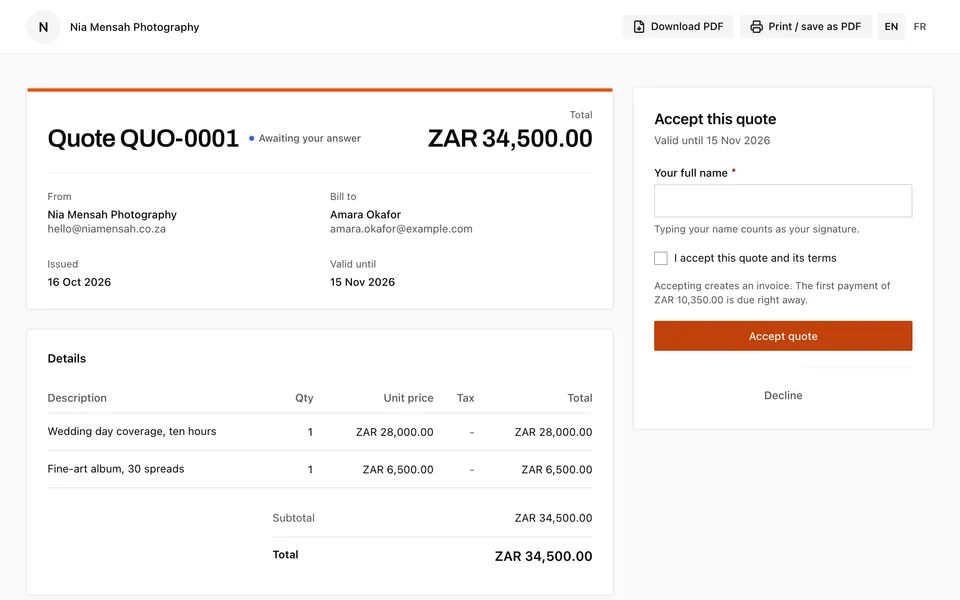
Build a quote from line items, with quantities, a tax rate per line and a discount as a percentage or an amount. Your client opens it from a link, with no account, and accepts it by typing their name, or declines it and tells you why. A quote stays valid for 30 days unless you set another date.
When they accept, the quote becomes an invoice on its own and is emailed to your client, who goes straight to the first payment. Nothing to retype.
Invoices in your studio's name
Invoices are numbered in order with your own prefix, and carry your address, your tax or registration number and your client's. Save your usual due date, notes and terms once. Each invoice and quote is in English or French, following your client's language, and so are the emails, the PDF and the payment page.
Invoice in your client's currency: US, Canadian or Australian dollars, euros, pounds, naira, cedis, Kenyan, Ugandan or Tanzanian shillings, rand, Rwandan francs, CFA francs, Congolese or Guinean francs, Moroccan dirhams or Egyptian pounds. The invoice goes out by email with its PDF attached, and the status follows the money: sent, viewed, partly paid, paid or overdue.
Paid into your own account
Connect your own Stripe account and your client pays by card on Stripe's secure page, from the invoice link, with no account. The money goes straight to your Stripe account, in USD, EUR, GBP, CAD or AUD, for businesses in the US, Canada, Australia, the UK and much of Europe.
Aurant's fee on invoice payments by card is shown in your Money settings before you send anything. Gallery sales carry no Aurant fee.
Paid in cash, by bank transfer or by mobile money outside Aurant? Record the payment on the invoice, in full or in part, and your client gets a receipt by email.
Deposits, instalments and reminders
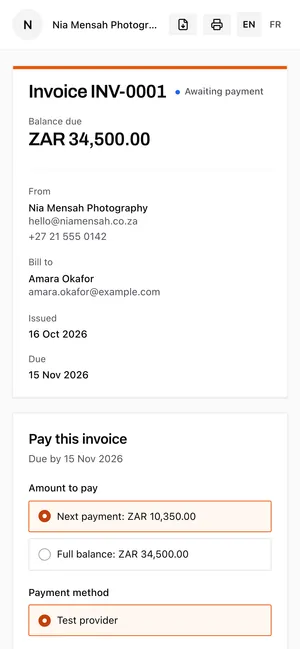
From Basic, split an invoice into a deposit and instalments, up to 12 payments, each with its own due date, as a percentage or a fixed amount; the last one always covers what is left. Your client pays the next payment or the whole balance, as they prefer.
Automatic reminders chase only the next unpaid payment: by default 3 days before it is due, on the day, then 3, 7 and 14 days after. Your client never gets more than one a day, and they stop as soon as it is paid. Change the timing to suit you. On Free, you send a reminder yourself in one click.
Photos that open when the invoice is paid
Tie a client gallery to your client's invoice and they can look at every photograph, but nothing downloads until it is paid. The gallery shows the amount due with a Pay button, and downloads open on their own once the invoice is settled, online or by a payment you record. Your client then gets an email saying their photos are ready. This works on every plan, Free included.
Sell downloads, with no commission
From Basic, you can sell a whole gallery, single photographs or both, at your own prices, in web size, the original, or both. Buyers give a name and email, pay online and get a receipt, with no account. Aurant takes no cut; the payment provider charges its usual fees. If someone picks photos that would cost as much as the full gallery, they get the full gallery at its price.
What it costs
- Free: 3 invoices or quotes in all, paid online through your own provider, one payment per invoice, reminders you send yourself, and up to 3 clients.
- Basic, £9 a month: unlimited invoices, quotes and clients, deposits and instalments, automatic reminders, and gallery sales.
- Pro and Ultimate: the same, plus budgets and expenses for your projects.
There is no fee per invoice or per client on any plan, and a client can always pay an invoice you have already sent, whatever happens to your plan. See every plan, and contracts and booking for deposits taken when a client books.
Questions.
- Can my clients pay by mobile money?
- Not online yet: today, clients pay invoices online by card, through your own Stripe account. If a client pays you by mobile money, cash or bank transfer, record the payment on the invoice, in full or in part, and they get a receipt by email.
- Is invoicing included on the free plan?
- Yes: 3 invoices or quotes in all, paid online through your own payment provider, with one payment per invoice. Basic adds unlimited invoices, deposits and instalments, automatic reminders and gallery sales.
- Can I take a deposit and the balance later?
- From Basic, yes. Split any invoice into a deposit and instalments, up to 12 payments, each with its own due date, and automatic reminders chase each one in turn.
- Can clients accept a quote online?
- Yes. They open the link, with no account, and accept by typing their name, or decline and say why. An accepted quote becomes an invoice on its own.
- Does Aurant take a cut of gallery sales?
- No. You set the prices and Aurant takes no cut; the payment provider charges its usual fees.
- Can I keep photos locked until the client pays?
- Yes, on every plan. Tie the gallery to the client's invoice: they can view the photographs, and downloads open on their own once the invoice is paid.
Client galleries · Video delivery · Portfolio website · Contracts and booking